
How many times have you hit “Confirm” in a DeFi flow without understanding the exact balance shifts, approvals, or gas mechanics that follow? For power users managing cross-chain positions, that click is the single most consequential moment in a wallet — and it’s where Rabby’s transaction simulation and pre-signature risk scanning claim to change the decision calculus. This article walks through how Rabby installs and integrates into a DeFi workflow for US-based users, explains how its simulation engine works in practical terms, and surfaces the trade-offs and blind spots that matter when you run real capital through multi-chain strategies.
If you already know the basics of seed phrases and hardware wallets, read on for mechanism-level detail: what Rabby simulates, how it displays results, what it cannot see, and how to combine its features (approval revocation, gas top-up, auto network switching) into operational safety routines. I’ll also correct common misconceptions and give a compact decision framework you can reuse when evaluating any wallet that promises “no blind signing.”
Installing Rabby: practical steps and security checklist
Rabby is available as a browser extension for Chromium-based browsers, a desktop client (Windows/macOS), and mobile apps for iOS and Android. For most DeFi power users on desktops, the browser extension is the entry point because it connects to dApps with minimal friction and supports hardware wallets. If you want to preview the extension and its documentation before installing, use the rabby wallet extension to land on the project’s install and resource pages.
Installation steps (high level):
1) Choose the platform: extension for Chrome/Brave/Edge, or desktop/mobile client. 2) Verify the source: install from the official store or the project’s canonical page — avoid third-party mirrors. 3) Create or import a wallet: Rabby supports new seed creation, seed import, and private key import. 4) Connect hardware wallets: Rabby integrates with Ledger, Trezor, Keystone and others; prefer hardware signing for high-value accounts. 5) Configure defaults: set the default account, enable or disable automatic network switching, and review any permissions the extension requests.
Security checklist during install (practical heuristics):
– Verify the extension publisher and checksum where possible; browser stores occasionally host lookalikes. – Pair a hardware device and confirm that signing requires physical approval; this is your strongest protection against remote malware. – Note that Rabby is open-source under MIT, which allows auditing, but open source is a necessary, not sufficient, security signal — check for active audits and community scrutiny. – Because Rabby lacks an in-wallet fiat on-ramp, don’t expect direct bank-to-wallet flows; use regulated on-ramps or centralized exchanges when necessary and transfer on-chain carefully.
How Rabby’s transaction simulation works — mechanisms, visibility, and limits
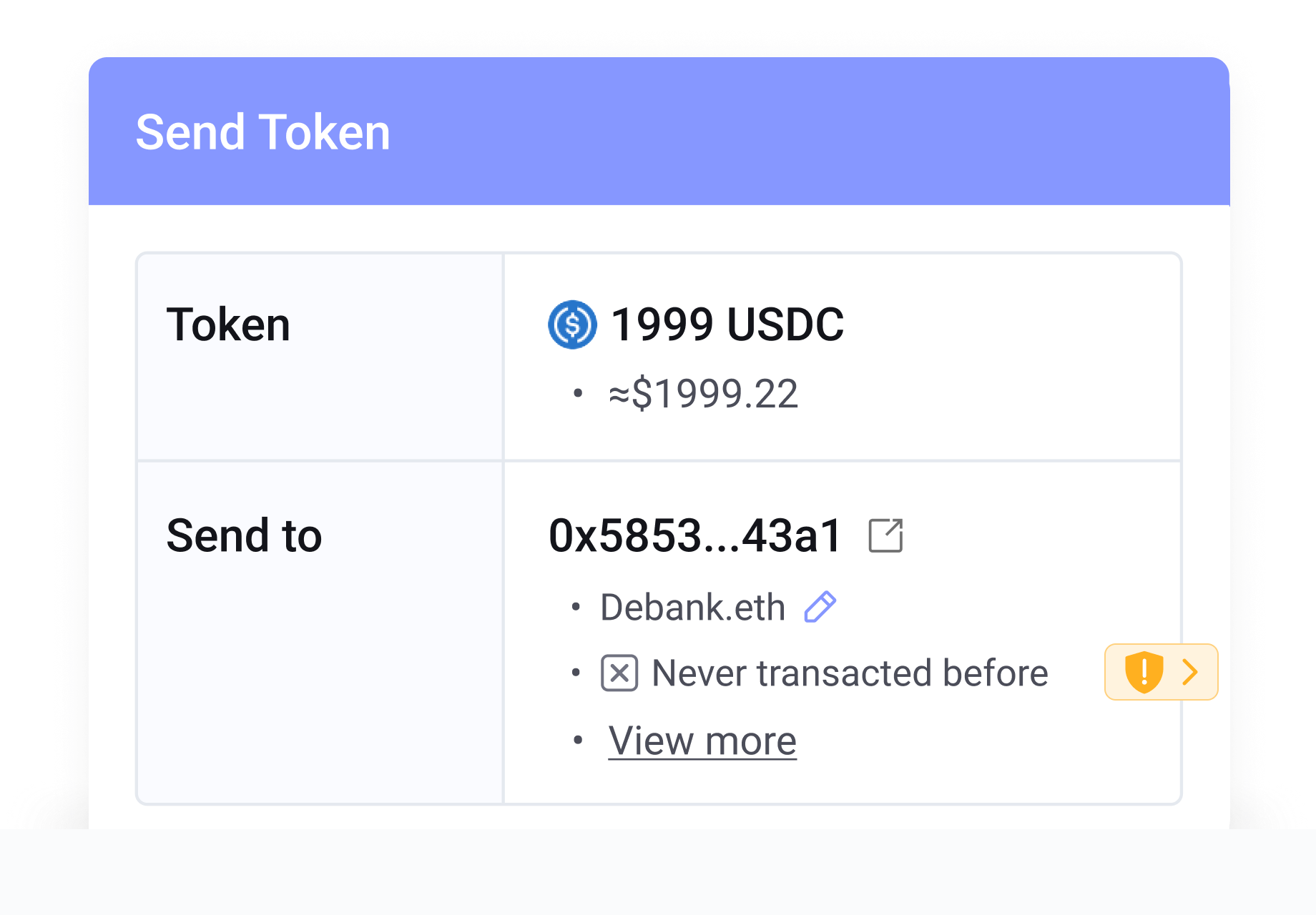
Rabby’s core claim that distinguishes it from many wallets is simulation-before-signing: it runs the proposed transaction through a local or remote simulation engine and surfaces the estimated token balance changes and fee costs before you authorize the signature. Mechanistically, simulation means executing the intended transaction (or transactions) against a node or a local EVM execution environment using the current block state. The result is a deterministic snapshot: which token transfers would occur, how much gas the execution path would consume under current conditions, and what approvals get invoked.
What the simulation typically shows: a concrete list of input and output token balances for the account, an estimated gas fee in the chosen fee token, and any approvals the call will consume. Rabby augments that with a pre-transaction security scan that flags known-bad contract addresses (previously exploited contracts), suspicious approval patterns (infinite approvals, unusual spender addresses), and obviously incorrect recipients (zero-address or non-existent targets).
Important limitation: simulations are only as good as the state and the execution model. If a transaction depends on off-chain randomness, or on mempool reordering, or on dynamic on-chain oracle updates between simulation and inclusion, the actual outcome when mined can differ. In other words, simulation eliminates a class of “blind signing” risks (you don’t sign without seeing the modeled balance changes) but cannot guarantee the future state once network conditions or external contracts change between simulation and confirmation. This is a predictable gap — and one you should manage rather than pretend to eliminate.
Trade-offs: what simulation buys you and what it doesn’t
Benefits (clear and practical):
– Explicit visibility: you can see token deltas, so UX errors and unexpected token burns or slippage are easier to spot. – Approval-awareness: Rabby integrates approval revocation tools, so you can cancel dangerous open allowances discovered during scanning. – Fewer social-engineering losses: a user is less likely to blindly sign a malicious request if the simulation clearly shows an improbable token outflow.
Residual risks and trade-offs:
– Race conditions and MEV: front-running, sandwich attacks, or oracle manipulations between simulation and mining are not eliminated. If your transaction is large or illiquid, consider private mempool submission or higher-level MEV defenses in addition to simulation. – Simulation fidelity: some complex contracts use delegatecall patterns, on-chain code that queries block.timestamp or block.number, or rely on off-chain services (e.g., keepers). Simulations might approximate these paths poorly or not at all. – False negatives: the pre-scan flags known bad actors but cannot detect every novel exploit pattern. It’s an alert system, not an infallible oracle.
For more information, visit rabby wallet extension.
Operational workflows that leverage Rabby’s features
For US-based DeFi power users, here are practical routines that make simulation and other Rabby features operational rather than decorative:
1) “Preview, then hardware sign”: run the simulation in the extension, review delta lines, then sign with a connected Ledger/Trezor. If the simulated delta doesn’t match your intended trade, cancel. 2) “Approval hygiene”: before interacting with new contracts, open Rabby’s approval manager and revoke any lingering infinite allowances you don’t recognize. 3) “Gas top-up for cross-chain ops”: if you plan to execute a move on a lesser-funded EVM chain, use Rabby’s cross-chain gas top-up to ensure you can pay fees without creating another risk surface. 4) “Auto network switching with caution”: automatic network switching minimizes manual errors but audit which dApp triggers a network change — phishing sites can attempt to trick less careful users with fake dApp flows on testnets or obscure chains.
Combine these into a reusable heuristic: Preview -> Verify -> Hardware-sign -> Revoke. That sequence reduces most human and UI-driven risks without slowing down advanced strategies unnecessarily.
Past incident and what it teaches about limits
Rabby’s 2022 Swap contract exploit (about $190,000 lost) is a sobering reminder that a secure wallet UI is one layer in a larger stack. The team froze the contract, compensated users, and tightened audits — appropriate responses — but the incident underlines that wallet-level protections cannot fully prevent smart contract vulnerabilities in integrated dApps. Always separate funds by risk tier: keep capital that interacts with experimental smart contracts distinct from capital used for long-term holdings or institutional custody, where Rabby supports multi-sig and integrations with Gnosis Safe and custody providers like Fireblocks and Amber.
What to watch next: because Rabby is open-source and actively integrates multi-sig and hardware support, its main security exposure path is external contracts and user operational errors. Keep an eye on audits of major dApps you interact with, changes to multi-chain routing behavior, and the wallet’s handling of mempool submission options (private relay, flashbots integration) which can materially alter exposure to MEV.
Comparisons and where Rabby fits in your toolbox
Compared to MetaMask, Trust Wallet, and Coinbase Wallet, Rabby differentiates through its simulation-before-signing, automatic network switching, and approval-revocation UX. That doesn’t make it strictly “better” for every use case. If you need fiat on-ramps inside the wallet or native staking UI, Rabby’s current limitations matter. For institutional users or those managing pooled funds, Rabby’s integrations with Gnosis Safe and custody partners are important signals — but an enterprise-grade workflow still depends on organizational controls outside the wallet itself.
Decision heuristic: if you execute cross-chain DeFi strategies, value pre-signature clarity, and prioritize hardware or multi-sig integration, Rabby is a sensible component. If your primary need is a one-click fiat on-ramp and simplified staking, you will need complementary services.
FAQ
Does Rabby’s simulation prevent all risky transactions?
No. Simulation prevents many types of blind-signing mistakes by showing estimated token deltas and fee costs before you sign. It does not prevent race conditions, MEV-based manipulation, or contract-level vulnerabilities that depend on state changes between simulation and on-chain execution. Treat simulation as an important defense layer, not an absolute guarantee.
Can I use Rabby with a Ledger or Trezor?
Yes. Rabby supports a wide range of hardware wallets (Ledger, Trezor, Keystone, and more). Using a hardware wallet for signature confirmation combined with Rabby’s simulation is one of the best practical defenses for high-value accounts.
How does Rabby handle approvals and revocation?
Rabby includes a native approval revocation tool that lists active allowances granted to smart contracts and DEXes and allows users to cancel them. This reduces exposure from long-lived infinite approvals, but revocation itself costs gas and can be front-run in congested markets — prioritize revoking approvals on high-risk tokens and monitor on-chain events.
Is Rabby safe for institutional use?
Rabby integrates with multi-signature and enterprise custody solutions like Gnosis Safe, Fireblocks, and Amber, which makes it usable within institutional workflows. However, institutional security depends on broader controls (key management policies, compliance integration, operational procedures), not just the wallet UI.
Final takeaways and a practical checklist
Rabby’s transaction simulation moves a realistic needle in reducing blind signing: it provides concrete, pre-signature balance deltas and fee estimates and links that visibility with approval hygiene and cross-chain convenience. That combination addresses an important behavioral and technical failure mode in DeFi UX. But it doesn’t eliminate structural risks like smart contract bugs, oracle attacks, or MEV. To use Rabby effectively in the US market as a power user, pair it with hardware signing, maintain approval discipline, segregate funds by risk tier, and stay aware of mempool and oracle dynamics when executing large trades.
If you want to experiment with Rabby and review its documentation or extension page, visit the rabby wallet extension to get started with installation and the security features described above. Your next click will still matter — but with simulation and a disciplined workflow, it can be an informed one.